Disclosure: As an Amazon Associate I earn from qualifying purchases.
A large or multistory home can expose the weak points in an older router quickly: slow upstairs rooms, unreliable smart-home devices at the edge of coverage, and wireless mesh nodes that lose too much capacity communicating with one another. Wi-Fi 7 mesh hardware can help, but the right system depends as much on node placement and backhaul as its advertised speed class.
The best Wi-Fi 7 mesh systems for large homes combine enough nodes for the layout, useful multi-gigabit Ethernet connections, and a backhaul plan that does not turn distant rooms into a compromise. For some homes, that means a premium quad-band system with a dedicated wireless backhaul. For others, a tri-band mesh with Ethernet cabling between nodes is the more practical and potentially better-performing choice.
The coverage and capacity figures below are manufacturer claims, not directly comparable independent test results. Thick plaster, brick, concrete, radiant barriers, HVAC equipment, and the location of your internet connection can all substantially change the result in your house.
Quick picks: the best Wi-Fi 7 mesh systems for large homes
- Best for maximum claimed coverage and dedicated backhaul: NETGEAR Orbi 970. Its quad-band design and dedicated backhaul make it a strong fit for very large homes where running Ethernet is difficult.
- Best for flexible multi-gigabit networking: TP-Link Deco BE85. It offers two 10Gbps WAN/LAN ports, additional 2.5Gbps ports, USB 3.0, optional Ethernet backhaul, and compatibility with other Deco models.
- Best for straightforward management and smart-home households: eero Max 7. It has two 10GbE ports, two 2.5GbE ports, and a claimed 2,500 square feet of coverage per unit.
- Best for broad claimed coverage with a simpler port layout: Linksys Velop Pro 7. A three-pack is rated for up to 9,000 square feet and supports either wired or wireless backhaul.
These are editorial recommendations based on the vendors’ published specifications, network design options, and the needs of large homes. Before buying, confirm the current U.S. price, included node count, firmware feature availability, return policy, and whether your ISP setup needs special configuration.
What matters most in a large-home mesh system
Backhaul matters more than headline speed ratings
Mesh nodes need a connection back to the main router. That connection is called the backhaul. With a wireless backhaul, nodes use Wi-Fi spectrum to communicate with one another as well as with your phones, laptops, TVs, and smart devices. With a wired backhaul, each node uses Ethernet instead.
For a large house, wired Ethernet backhaul is usually the most reliable option when cabling is realistic. It can preserve more wireless capacity for client devices and reduces the impact of floors, walls, and distance between nodes. It may require Cat6 or Cat6a cabling, a switch, and available Ethernet ports at each node location.
If you cannot run Ethernet, prioritize node placement and consider a system designed with dedicated wireless backhaul capacity. A dedicated backhaul does not eliminate the effects of walls and distance, but it can help separate inter-node traffic from client traffic.
Coverage claims are planning estimates, not guarantees

A vendor’s square-foot estimate is useful for narrowing the shortlist, but it cannot predict performance in every building. Open-plan homes with drywall are much easier to cover than homes with dense materials, foil-backed insulation, masonry fireplaces, metal ducts, or long narrow layouts.
Do not assume three nodes cover exactly three times as much area as one node. The nodes must overlap enough to maintain a healthy connection. A system can be technically within its advertised coverage number yet still struggle if a satellite is placed at the far edge of the main router’s signal.
Multi-gigabit ports can prevent a wired bottleneck
A 1Gbps Ethernet port can limit a faster internet plan, a fast wired backhaul, or a network-attached storage connection. If you have gigabit-plus service, a multigig fiber handoff, or a 2.5Gbps or 10Gbps switch, look closely at each unit’s port layout—not just the main router’s ports.
Also verify your modem, ISP gateway, optical network terminal, switch, and cables. A mesh system with 10Gbps ports cannot make an older 1Gbps modem or switch operate at multi-gigabit speeds.
Wi-Fi 7 clients unlock the fullest benefits, but older devices still connect
Wi-Fi 7 routers remain backward compatible with earlier Wi-Fi generations. That means an upgrade can still improve a household’s overall network design by adding better coverage, wired capacity, and newer mesh hardware even if many current devices use Wi-Fi 6, Wi-Fi 6E, or older standards.
Features associated with Wi-Fi 7 include wider 320MHz channels and Multi-Link Operation, which can improve efficiency and allow compatible devices to use multiple links. The Wi-Fi Alliance describes these as part of the Wi-Fi 7 platform, but practical results depend on compatible clients, configuration, local spectrum conditions, and available 6GHz channels. Read the Wi-Fi Alliance’s Wi-Fi CERTIFIED 7 overview for broader technical context.
NETGEAR Orbi 970: Best for maximum coverage and dedicated backhaul

The NETGEAR Orbi 970 is the premium option here for buyers whose first concern is covering a very large home without relying on Ethernet between every node. It is a quad-band Wi-Fi 7 mesh system with a dedicated backhaul, a design that gives inter-node traffic its own wireless capacity rather than asking it to compete entirely with client devices.
NETGEAR markets the three-pack for up to 10,000 square feet and up to 200 concurrent devices, with 10Gbps Internet/LAN connectivity. Those are manufacturer specifications, so treat them as an upper-bound planning figure rather than a promise for every 10,000-square-foot property.
This is the system to consider when you have a large footprint, multiple floors, many active devices, and no easy way to install Ethernet at every satellite position. Its dedicated-backhaul approach can be particularly appealing in layouts where nodes need to communicate across a floor or through several interior walls.
The tradeoff is premium positioning. Buyers should compare current bundle pricing with the cost of alternatives plus Ethernet cabling, switches, or extra nodes. NETGEAR also notes that real throughput and coverage vary with construction, traffic, client capabilities, regulations, and environmental conditions. Review the current specifications on the NETGEAR Orbi 970 product page before choosing a pack size.
TP-Link Deco BE85: Best for flexible multi-gigabit networking
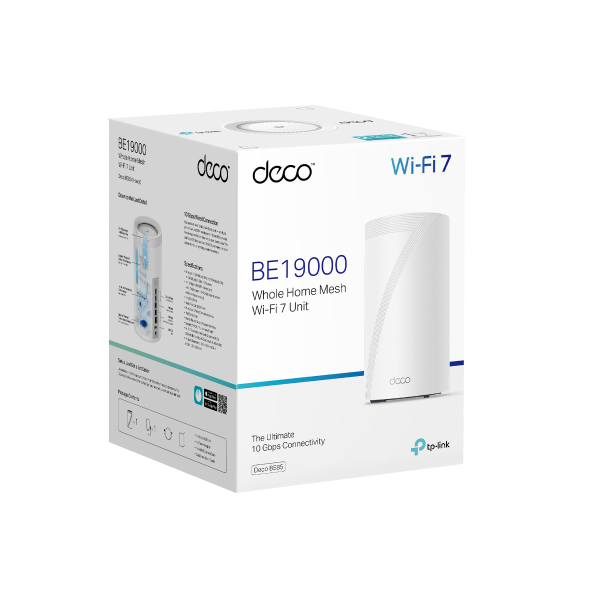
The TP-Link Deco BE85 is a tri-band Wi-Fi 7 system aimed at buyers who want substantial wired-network flexibility. Each unit includes two 10Gbps WAN/LAN ports, additional 2.5Gbps ports, and a USB 3.0 port. That makes it especially worth considering for homes with multi-gig internet, wired desktops, a fast NAS, or plans to use Ethernet backhaul.
Its tri-band design differs from the Orbi’s dedicated-backhaul approach. In a wireless-only setup, the node-to-node connection shares available wireless resources. But with Ethernet backhaul, that distinction becomes less important because the wired connection takes over the inter-node job.
Deco BE85 also supports optional Ethernet backhaul and works with other Deco models, which can be useful for an incremental expansion plan. Mixing models can be convenient, but do not assume every node will deliver the same radio capability or wired-port capacity. Use the higher-spec units where traffic demand is greatest, such as the main router location and a busy office or entertainment area.
TP-Link publishes results from a 4,600-square-foot, two-story test-villa scenario and reports higher performance with wired backhaul than wireless backhaul. That is useful directional guidance, not neutral comparative testing. For a large house with existing Ethernet—or a realistic plan to add it—the Deco BE85 is one of the strongest choices in this Wi-Fi 7 mesh system comparison. See TP-Link’s current Deco BE85 specifications and test disclosures before buying.
eero Max 7: Best for simple setup and smart-home households

The eero Max 7 is a tri-band Wi-Fi 7 mesh system for households that value straightforward network management along with substantial wired capacity. Each device has two 10GbE ports and two 2.5GbE ports, making it a practical candidate for a multigig internet connection, wired backhaul, or a small high-speed wired network.
eero claims coverage of up to 2,500 square feet per Max 7 device and support for more than 200 devices. It also lists wireless speeds up to 4.3Gbps and wired speeds up to 9.4Gbps. As with all vendor speed and coverage figures, your home layout, client devices, and backhaul arrangement matter more than the number on the box.
This model makes particular sense for households with a large number of connected smart-home devices, work-from-home equipment, streaming devices, and phones. Straightforward administration can be valuable when the person managing the network does not want to tune advanced settings regularly.
eero says Max 7 units can be mixed with older-generation eero hardware, though it recommends using the same generation throughout the network for optimal performance. If you are expanding an existing eero installation, verify which unit will serve as the gateway and whether an older node would become the limiting link in an important part of the home. Review eero’s Max 7 support specifications for current compatibility details.
Linksys Velop Pro 7: Best for broad claimed coverage with simple setup

The Linksys Velop Pro 7 is a tri-band Wi-Fi 7 option that balances broad advertised coverage with a less elaborate wired-port arrangement. Linksys rates a three-pack for up to 9,000 square feet and supports both wireless and wired backhaul.
Each unit has a 2.5Gbps Internet port and four 1Gbps Ethernet ports. That can be a good fit for a household with a 1Gbps or lower internet plan and several wired devices near each node, such as TVs, game consoles, printers, or desktop computers.
Buyers with 2Gbps-plus service or a 2.5Gbps wired-backhaul plan should look more carefully at the port limitations. The four 1Gbps LAN ports are useful, but they do not replace multi-gigabit LAN connections when your goal is to move more than 1Gbps between wired devices.
For a large home where easy deployment and broad claimed coverage are the priorities, Velop Pro 7 is a sensible alternative to more complex premium systems. As always, check whether the three-pack’s coverage estimate fits your home’s materials and layout rather than choosing based on square footage alone. See Linksys’ Wi-Fi 7 product information for current configuration details.
How to choose and place the best Wi-Fi 7 mesh systems for large homes

Start by mapping the places where the network must work well, not just the home’s total square footage. Common priority areas include upstairs bedrooms, a home office, a media room, a garage, a patio, and locations with smart locks, cameras, or other connected devices.
- Put the main router near the center of activity when possible. A basement utility room or a far exterior wall may be convenient for the ISP connection but can be poor for whole-home coverage. If the modem or fiber handoff cannot move, consider using Ethernet to place the primary mesh node more centrally if your setup allows it.
- Place satellites between the main router and weak zones. A node needs a strong enough upstream connection before it can provide a strong connection to nearby devices. Avoid placing a satellite only after the signal has already become weak.
- Use one node per floor when the structure demands it. Floors can be significant barriers, especially concrete, dense wood, tile, and homes with mechanical equipment between levels. An open stairwell may help, but do not count on it.
- Prefer Ethernet backhaul for distant or difficult nodes. A wired connection is often the cleanest fix for a detached office, finished basement, upper floor, or media room with heavy streaming and gaming use.
- Keep nodes in the open. Avoid cabinets, enclosed media centers, behind large TVs, and next to major metal objects. Place units on a shelf, table, or open console where practical.
- Test before permanently mounting or hiding equipment. Walk the home with the devices you actually use. Test video calls, downloads, gaming, and smart-home responsiveness at typical busy times.
The 6GHz band can add valuable capacity, but it generally has shorter range and weaker wall penetration than lower-frequency Wi-Fi bands. U.S. 6GHz operation is also subject to FCC equipment and power rules. In practical terms, do not expect 6GHz alone to solve a distant-room problem; good node placement and backhaul are still essential.
Do you need Wi-Fi 7 yet?
Wi-Fi 7 is most compelling when you are replacing aging Wi-Fi 5 hardware, building a new multi-gigabit network, dealing with many active devices, or buying a mesh system you expect to keep for several years. It is also attractive if you already own Wi-Fi 7 phones, laptops, or adapters that can take advantage of newer capabilities.
If you have a working Wi-Fi 6E mesh system, sub-gigabit internet, and no persistent coverage or congestion issue, an immediate upgrade may not be necessary. Wi-Fi 6E can still be a capable choice when nodes are well placed and the network has sufficient wired backhaul.
For most buyers, the decision should not come down to whether every current device supports Wi-Fi 7. Focus first on the network architecture: the number of nodes, their locations, the availability of Ethernet, the speed of your ISP service, and the ports needed for wired equipment. Those choices will have a visible effect on daily reliability even while your device mix gradually changes.
Bottom line
Among the best Wi-Fi 7 mesh systems for large homes, NETGEAR Orbi 970 stands out for buyers who need premium claimed coverage and dedicated wireless backhaul. TP-Link Deco BE85 is especially compelling for homes built around 10Gbps and 2.5Gbps wired networking. eero Max 7 is a strong fit for straightforward management and smart-home-heavy households, while Linksys Velop Pro 7 offers broad claimed coverage and wired-backhaul support with a more modest multi-gig port setup.
Before ordering, verify the current package contents and price, your ISP’s modem or fiber requirements, the feasibility of wired backhaul, and the return window. A carefully placed two- or three-node system with Ethernet where it matters will usually serve a large home better than a more expensive mesh kit placed too far apart.
Useful references: Orbi 970 3-Pack Quad-Band WiFi 7 Mesh System · Deco BE85 | Deco 7 Elite BE22000 Tri-Band Whole Home Mesh WiFi 7 System
Related Home Tech Signal guides: Best Home Battery Backup Systems for Power Outages · Best AI Robot Vacuums for Cluttered Homes and Multi-Level Cleaning